帝國CMS遠程圖片如何自動本地化并生成縮略圖
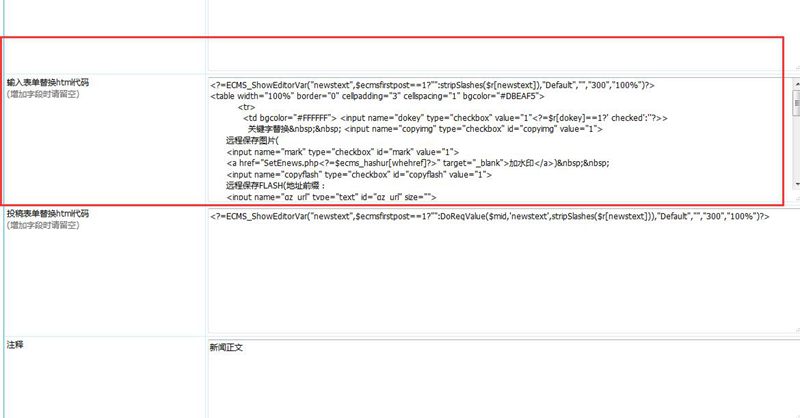
修改表單中的代碼,
遠程保存圖片:
將<input name="copyimg" type="checkbox" id="copyimg" value="1" >
改成<input name="copyimg" type="checkbox" id="copyimg" value="1" checked="checked">
加水印將 <input name="mark" type="checkbox" id="mark" value="1" >
改成 <input name="mark" type="checkbox" id="mark" value="1" checked="checked">
取第一張圖片并上傳為縮略圖并自動裁剪
將<input name="autosize" type="text" id="autosize" value="5000" size="5">
個字節為一頁 取第
<input name="getfirsttitlepic" type="text" id="getfirsttitlepic" value="0" size="1">
張上傳圖為標題圖片(
<input name="getfirsttitlespic" type="checkbox" id="getfirsttitlespic" value="1">
改成<input name="autosize" type="text" id="autosize" value="5000" size="5">
個字節為一頁 取第
<input name="getfirsttitlepic" type="text" id="getfirsttitlepic" value="1" size="1">
張上傳圖為標題圖片(
<input name="getfirsttitlespic" type="checkbox" id="getfirsttitlespic" checked="checked" value="1">
或者把下面的代碼直接粘入:
<?=ECMS_ShowEditorVar("newstext",$ecmsfirstpost==1?"":stripSlashes($r[newstext]),"Default","","600","100%")?>
<table width="100%" border="0" cellpadding="3" cellspacing="1" bgcolor="#DBEAF5">
<tr>
<td bgcolor="#FFFFFF"> <input name="dokey" type="checkbox" value="1"<?=$r[dokey]==1?' checked':''?>>
關鍵字替換 <input name="copyimg" type="checkbox" id="copyimg" value="1" checked="checked">
遠程保存圖片(
<input name="mark" type="checkbox" id="mark" value="1" >
<a href="SetEnews.php<?=$ecms_hashur[whehref]?>" target="_blank">加水印</a>)
<input name="copyflash" type="checkbox" id="copyflash" value="1">
遠程保存FLASH(地址前綴:
<input name="qz_url" type="text" id="qz_url" size="">
)</td>
</tr>
<tr>
<td bgcolor="#FFFFFF"><input name="repimgnexturl" type="checkbox" id="repimgnexturl" value="1"> 圖片鏈接轉為下一頁 <input name="autopage" type="checkbox" id="autopage" value="1">自動分頁
,每
<input name="autosize" type="text" id="autosize" value="5000" size="5">
個字節為一頁 取第
<input name="getfirsttitlepic" type="text" id="getfirsttitlepic" value="1" size="1">
張上傳圖為標題圖片(
<input name="getfirsttitlespic" type="checkbox" id="getfirsttitlespic" checked="checked" value="1">
縮略圖: 寬
<input name="getfirsttitlespicw" type="text" id="getfirsttitlespicw" size="3" value="<?=$public_r[spicwidth]?>">
*高
<input name="getfirsttitlespich" type="text" id="getfirsttitlespich" size="3" value="<?=$public_r[spicheight]?>">
)</td>
</tr>
</table>
聲明:本文內容由互聯網用戶自發貢獻,該文觀點僅代表作者本人。本站僅提供信息存儲空間服務,不擁有所有權,不承擔相關法律責任。如發現本站有涉嫌抄襲侵權/違法違規的內容, 請發送郵件至201542412@QQ.com舉報,一經查實,本站將立刻刪除。
相關推薦
-

帝國CMS多表調用最新信息的方法
這篇文章主要為大家介紹了帝國CMS多表調用最新信息的方法,主要通過靈動標簽的sql語句調用結合union來實現,是非常實用的技巧,需要的朋友可以參考下
-

帝國CMS判斷是否有內容分頁的方法
帝國CMS判斷是否有內容分頁,有就顯示,沒有就不顯示。以免沒有的分頁的時候占了一行位子,不是非常美觀。
-

帝國CMS商城系統如何實現在線支付后發送訂單郵件提醒功能
帝國CMS是個強大的內容管理系統,其商城的功能也很強大,當用戶下單,支付后我們怎么知道有用戶下單了呢?因為我們不能時時刻刻都在網站后臺,不斷的刷新頁面去看有無訂單,最常用的做法是用郵件提醒我們,有人下單了.
-
帝國CMS內容頁附件中文顯示或者顯示代碼名稱下載
在帝國CMS模板制作中,比如內容頁面顯示該內容的附件地址,必須顯示原始路徑地址,或者說想要中文的路徑地址。那么就要用以下方法來實現了:
-
帝國cms加載更多時調用對應文章的tags標簽和鏈接
帝國cms如果使用點擊加載更多的時候怎么樣連gs標簽和鏈接一起循環出來,如果是調用標題,簡介,瀏覽,時間,這些單一的字都很簡單